Advertising Alloconomy, Part 12: Who Earns the TV Home-Screen Dollar?
A sponsored tile sells discovery before playback. Device navigation and commercials inside an app have different selling rights.
At the screen
Maya powers on Fire TV before deciding what to watch. This time the advertiser is an eligible streaming-app marketer promoting its app or title, rather than Northstar selling headphones. Its operator has bought Fire TV Sponsored Tiles with the Drive impressions and clicks objective under the supported Entertainment Spotlight setup. Maya scrolls to a sponsored row, highlights a tile, and presses Select to explore the destination.
Amazon controls this interface placement. In this selected CPC setup, it counts qualifying clicks. The inventory monetizes discovery and navigation before content playback. Highlighting a tile can reveal information without producing the actual click on which the product's documentation says charging occurs. A remote control can produce a CPC transaction just as a mouse can. Fire TV placement specification; Entertainment Spotlight pricing guidance
Advertising Alloconomy · Placement map · Part 12
Fire TV · Sponsored Tiles
An eligible app or title advertiser pays for discovery on the Fire TV home screen.
Read from the advertiser toward the audience. Connections show roles in the chosen route, not cash transfers or request timing.
A TV home-screen promotion is a different placement from a commercial inside a show.
This tour changes the advertiser: the selected product promotes an eligible app or title, not Northstar’s headphones. Focus, selection and playback are different actions. The chosen Drive impressions and clicks setup uses CPC; other objectives can use CPM. A separate device-maker commission is not implied.
Simplified teaching map. Company boundaries and contracts vary; one box does not mean one company or one fee. Dollar allocations appear in the separate money-flow diagrams. Those figures are indicative; actual business economics require case-by-case analysis.
Behind the placement
The advertiser supplies eligible artwork, a relevant promotion, and a working destination. Its operator configures the campaign. Amazon's interface and advertising system deliver the promotion into the navigation experience, and the destination fulfills Maya's selection. Those are the relevant functions in the chosen route; a separate manufacturer commission does not follow automatically from their appearance on a television.
| Role in this route | Work that earns its place | What must replace it |
|---|---|---|
| App/content advertiser and creative team | Supply an eligible title, artwork, and destination | Equivalent promotional assets and eligibility |
| Campaign operator | Configure the device campaign and interpret results | The advertiser's own capability or another operator |
| Amazon Fire TV interface and advertising system | Sell discovery within its navigation experience | Another accessible discovery surface |
| Promoted app or content destination | Fulfill the selection | A working destination relevant to the promotion |
Keep focus, selection, and playback separate. Maya can reveal additional imagery by moving the remote's focus, then make a deliberate selection, then begin watching content. The ad format and its counting rules determine which action matters to this campaign. A moving creative in the home screen does not become an in-stream commercial merely because it contains video.
The charge and the dollar
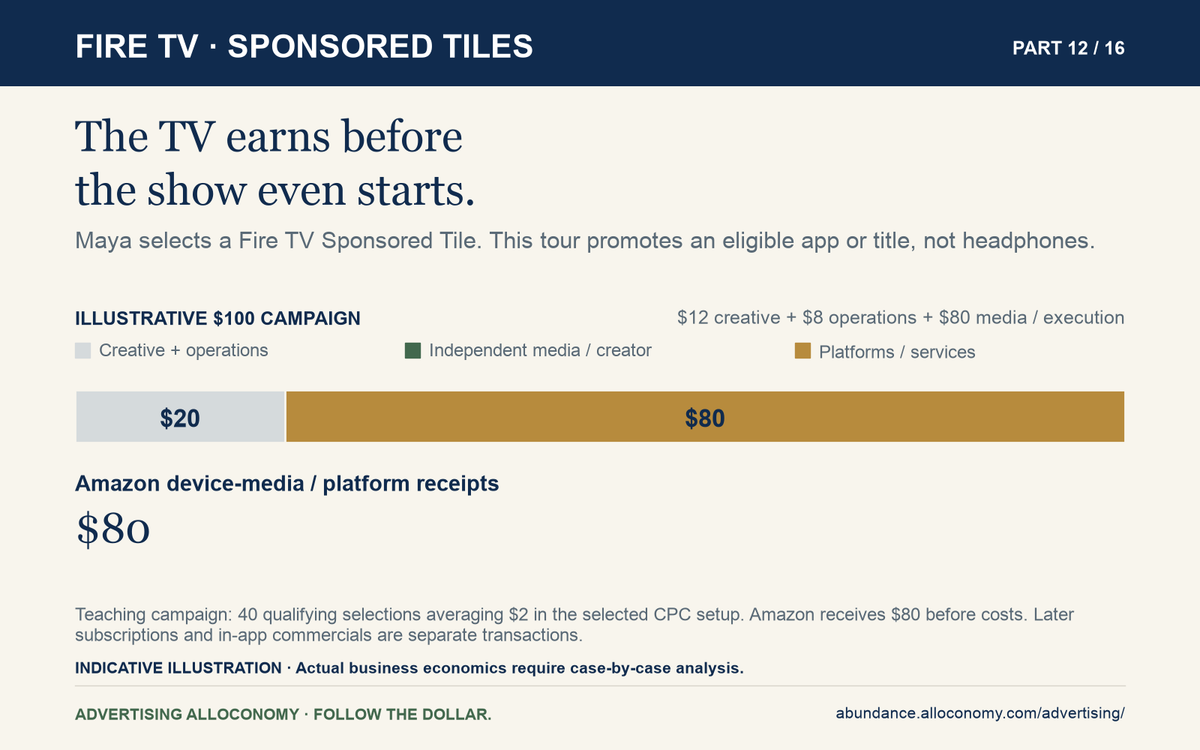
Assume 40 qualifying selections average a fictional $2 each. The marketer uses its $80 media allocation; the full external-expense model assigns $12 to creative and $8 to operations.
Follow the dollar
A Fire TV Sponsored Tile
Teaching campaign: 40 qualifying selections averaging $2.
Each ribbon ends at a recipient or disclosed bundle. Widths show final allocations, not the order of payments.
Exact amounts and accessible table
| Recipient | USD from original $100 |
|---|---|
| Creative | $12.00 |
| Campaign operations | $8.00 |
| Amazon device-media / platform receipts | $80.00 |
| Total | $100.00 |
Total external campaign expense$100.00
This is an eligible app or content promotion. Later subscriptions and in-app commercials are separate transactions. Each amount is also its percentage of the original $100. These are final allocations, not a payment sequence.
Amazon receives the $80 device-media/platform payment before costs and any applicable obligations. That bundle is not a disclosed technology margin. There is no extra operating-system, app-store, or manufacturer percentage in this chosen transaction simply because those labels also describe parts of the device ecosystem.
The charging record is the qualifying actual click, not focus alone. Subsequent subscriptions, app purchases, and commercials within the promoted app belong to other transactions. The visible interface helps identify the interaction; campaign and billing records establish what the buyer actually paid. Fire TV placement specification; Entertainment Spotlight pricing guidance
What changes on another route
Change the campaign objective first. Amazon documents CPC for Drive impressions and clicks, while supported subscription, rental/purchase, and first-app-open objectives use CPM. The same tile can therefore support different invoice units. The selected objective and buying agreement determine the rule; a visible tile alone does not. Entertainment Spotlight objective and pricing guidance.
Give every new surface its own identity before carrying over a billing assumption.
| Surface and visitor action | What changes from the chosen route | Consequence for the money |
|---|---|---|
| Fire TV Feature Rotator: encounters a prominent promotion | Different placement, creative behavior, and offer | Use its actual terms; do not inherit Sponsored Tiles' click tariff |
| Google TV Masthead: sees the Featured carousel and uses a call to action | Different seller and supported buying routes | Reservation may use CPM or cost per hour; separately priced DSP access depends on the route |
| Roku Home / Roku City: navigates the platform interface | Roku controls the selected interface opportunity | Trace the direct seller bundle and any separately contracted services |
| Xbox dashboard or store: browses a console promotion | Product eligibility and custom offer differ | Identify the specific seller and contract; no universal console fee follows |
| PS5 Live TV: selects and watches a channel | Changes to streaming inventory and its rights arrangement | Reconstruct the Part 11 route rather than treating it as a home-screen sale |
Sources: Feature Rotator; Google TV terms; Roku formats; Xbox integrations; Sony's PS5 launch
Amazon's Feature Rotator specification describes static imagery followed by autoplay behavior and destinations to watch, buy, or download. That is a different product from the selected tile in our story. Fire TV Feature Rotator
Google places its TV Masthead in the first Featured-carousel position on the For you tab, with supported app, installation, or QR-code destinations. Its overview describes reservation-oriented buying, while specific DV360 documentation also supports non-guaranteed instant deals. The guarantee comes from the buying arrangement, not the word Masthead. Google TV Masthead DV360 instant deals
A device historically called Chromecast, the Google TV interface, and an app running on it are different things. Google's documentation explicitly separates home-screen inventory, advertisements inside CTV apps, and separately sold Freeplay inventory. The operating system does not identify the seller of every subsequent commercial. Google TV inventory distinctions
Roku illustrates how corporate and functional maps differ. It describes Roku Exchange as supply-side technology and supports direct relationships and outside buying platforms. Historical OneView material describes a DSP; current material emphasizes Ads Manager and other programmatic routes. Those facts do not establish that OneView is discontinued or the only buying door. Roku programmatic solutions OneView's documented role
Roku's developer documentation also describes a default 30% allocation of inventory to Roku in its Inventory Split model. That is a fraction of opportunities in the applicable app arrangement, not 30% of every advertising dollar and not a universal home-screen rule. Different fill rates and prices can produce a different revenue division. It has no place as a cash deduction in our Fire TV chart. Roku inventory models
Microsoft's documented Xbox dashboard/store brand integrations are also distinct from its July 2026 limited optional ad-supported game-streaming test for Insiders, where ads precede a session. Neither establishes a generally available DSP route or advertisements inside all third-party games. Xbox custom integrations Xbox streaming test
What this changes for you: Fire TV Sponsored Tiles
This placement sells discovery before playback. In this tour the advertiser promotes an eligible app or title, rather than Northstar's headphones.
If you are Maya
Recognize a paid invitation at the point of choice.
A sponsored tile may help Maya find something to watch, but it should be evaluated as a commercial invitation. She can compare it with the content she intended to find. A prominent place on the home screen does not independently establish that the title is the best match for her.
If you work for the advertiser
Measure what happens after the tile.
For the app or title advertiser, distinguish a click or visit from an activated, retained, or paying viewer. Include the destination experience and contribution economics in the acquisition decision. Confirm the selected charging setup; the visual shape of a sponsored tile does not establish one universal invoice rule.
If you work in a business earning the ad dollar
Protect the usefulness of navigation.
Device-platform and app teams can evaluate paid discovery alongside successful content finding and repeat use. Distribution access can be valuable, but promoting unsuitable destinations can erode that value. Keep the home-screen selling right separate from the right to sell commercials inside the app Maya eventually opens.
If you are an investor
Distinguish distribution influence from content ownership.
Investigate which interfaces the company controls, which placements it can sell, and what agreements constrain monetization. Do not count another app's full advertising opportunity as device-platform revenue. The illustrative $80 receipt describes this selected interface purchase, not a claim on every commercial later shown through the device.
Decision to take away: judge the sponsored entrance by the valuable viewing or customer relationship it adds, rather than stopping at the click.
Reconstruct the journey
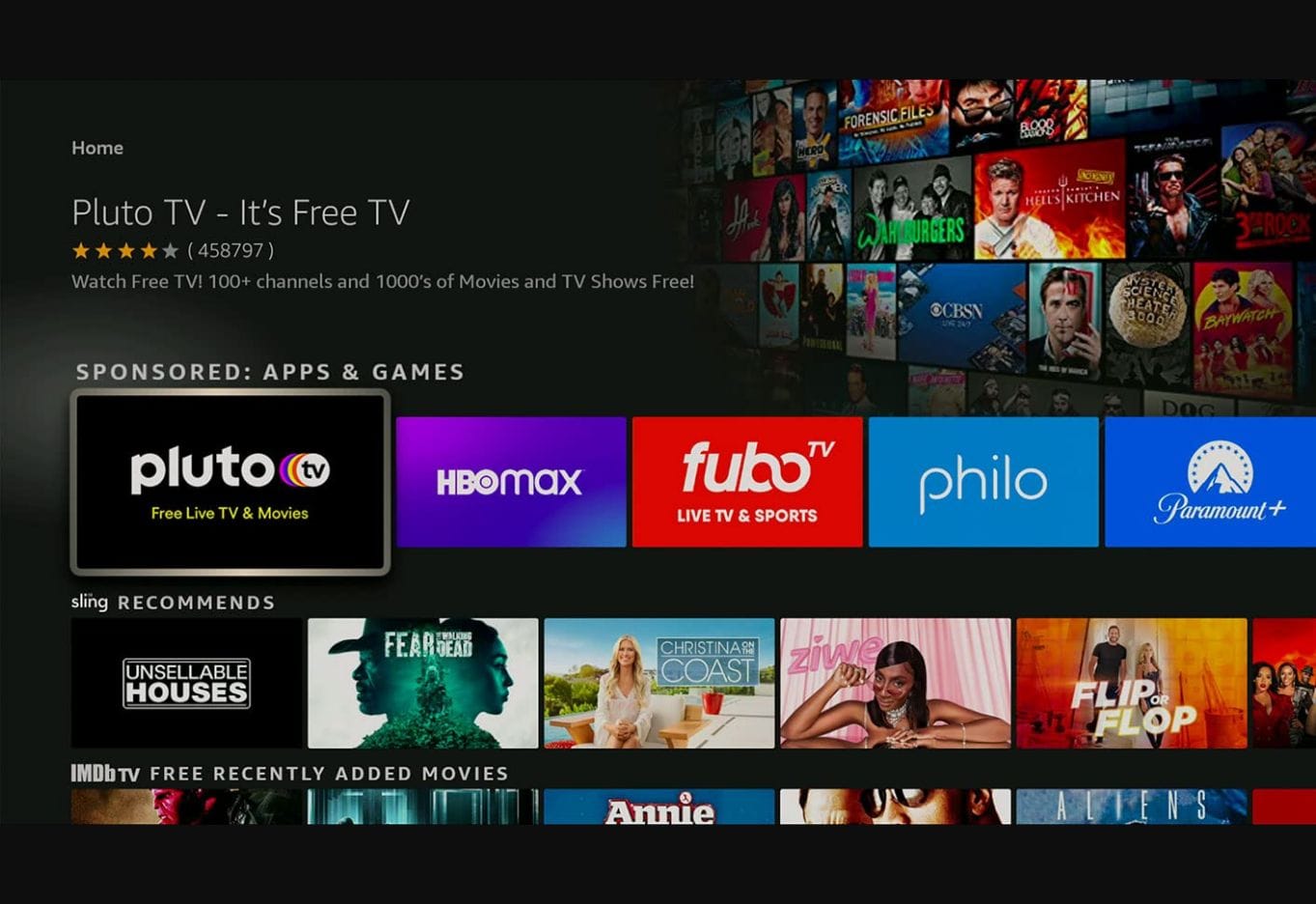
The official Fire TV Sponsored Tiles specification shows unselected and highlighted states, including Pluto TV beside other app tiles. The illustration retains older interface branding; it demonstrates an interaction rather than today's campaign lineup.
Compare the Feature Rotator, Google TV carousel, Roku gallery, and Xbox integrations. Availability can differ by device, country, and user.
Starting at a home screen, record what is visible before an app opens, what changes when focus moves, and what requires Select. Then open a viewing app and identify the seller of an in-stream commercial afresh. Opening Netflix from Roku Home does not carry the preceding interface ad's ownership into Netflix.
Finally, remove the external campaign operator from the Fire TV purchase. What work can the advertiser take over, and what access still requires Amazon? Contrast that feasible supplier replacement with removing permission to use the owned discovery placement itself.
Maya, Northstar Audio, City Ledger, and the assessment companies are fictional. Dollar examples are teaching scenarios unless explicitly labeled as disclosed rules or dated benchmarks. Provider illustrations show placement examples, not independently verified live campaigns. Product availability and terms vary by market; the main lens is the United States. Source links sit beside the claims they support.